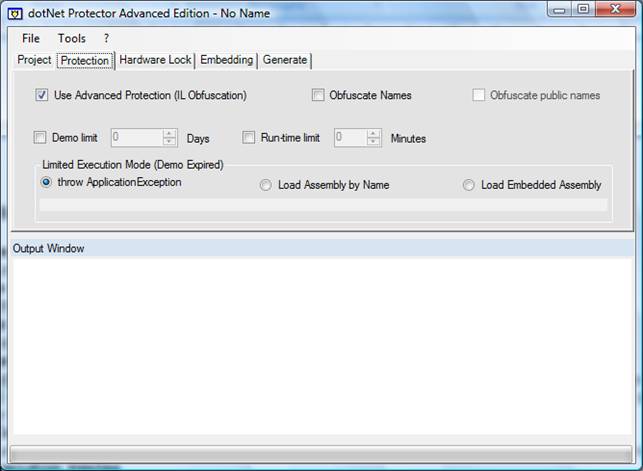
Use advanced protection (IL obfuscation)
Activate protection by methods encryption
Obfuscate names
Activate the ‘traditional’ obfuscation
Obfuscate public names
For Exe only, allows to obfuscate all the names.
Demo Limit
Sets the execution limit of your program (demonstration). The limit starts the date you generate the protected assembly and not it’s installation date. Note: when dotNet Protector runs in demo mode, your assembly will be limited to 5 days anyway.
Run-time Limit
Sets the run-time limit of your program (Exe only). The process will be killed when this period expires.
Limited execution Mode
Sets what will happen when the demo period expires (if no license can be granted)
Throw ApplicationException (default) : an ApplicationException will be thrown, killing the process.
Load Assembly by name : this allows you to tell an alternate assembly to load. You’ll be invited to browse an assembly to run, then its full name will be recorded in the protected assembly. It is highly recommended to select a strong name assembly.
Load embedded Assembly : you’ll have to browse for the alternate assembly to run; this assembly will be embedded in the final executable.
